CFSolver HTTP API
CFSolver 服务集成完整参考,支持解析 Cloudflare Turnstile、Cloudflare Challenge 和 reCAPTCHA Invisible 验证。
开始使用
选择您希望的 CFSolver 集成方式。
1. 概述
CFSolver 提供简单的 HTTP API,用于创建验证码解析任务并获取结果。
您可以直接使用带有 apiKey 的 JSON 请求,也可以复用现有的与 YesCaptcha、2Captcha、CapSolver 或 CapMonster 等服务商兼容的集成方式。
基本流程
- 通过
/createTask创建任务。 - 使用返回的
taskId调用/getTaskResult轮询结果。 - 将返回的 token 或 cookies 用于您的 HTTP 客户端或浏览器自动化。
2. 核心概念
任务 (Task)
任务代表一个由内部 worker 执行的验证码解析作业。
- 通过
taskId标识(字符串或数字,取决于请求格式)。 - 状态包括
queued(排队中)、processing(处理中)、ready(已完成)或failed(失败)。
验证码模块
- Cloudflare Turnstile — 许多网站使用的小部件式验证。
- Cloudflare Challenge — 全页面 5 秒拦截页,成功后获取
cf_clearancecookie。 - reCAPTCHA Invisible — Google reCAPTCHA v2/v3 隐形验证。
请求和响应格式
CFSolver 支持多种 JSON 格式,并将其转换为统一的内部模型:
- 使用 apiKey 的 JSON — 使用
apiKey和扁平的 JSON 请求体,包含type字段(如Turnstile、CloudflareChallenge、RecaptchaInvisible)。 - 兼容格式 — 使用
clientKey,将任务参数包装在嵌套的task对象中,使用各服务商特定的类型名称。
3. 认证方式
CFSolver 使用在 JSON 请求体中传递的 API 密钥进行认证:
- 使用扁平 JSON 任务格式时,在请求体中发送
apiKey。 - 使用兼容格式(将参数包装在
task对象中)时,发送clientKey。
所有接口必须通过 HTTPS 调用,使用 Content-Type: application/json。如果密钥缺失、无效或账户未激活,API 将返回 HTTP 401 响应和 JSON 错误对象。
4. HTTP API 参考
基础 URL
http://127.0.0.1:7643所有接口均使用 HTTPS,接受 JSON 请求并返回 JSON 响应。
4.1 POST /createTask
创建一个新的验证码解析任务。
根据您使用的请求格式,在 JSON 请求体中发送 apiKey 或 clientKey 以及任务参数。
4.2 POST /getTaskResult
获取已创建任务的状态和解析结果。
传入 /createTask 返回的 taskId 以及相同的认证密钥。
4.3 POST /waitTaskResult
长轮询端点,等待任务完成后再返回结果。
比重复轮询 /getTaskResult 更高效。服务器会保持连接直到任务完成或超时(最长 5 分钟)。
返回格式与 /getTaskResult 相同。如果超时,返回 status: "timeout",只需重新发起请求即可。
4.4 POST /getBalance
返回与您的密钥关联的账户余额。
响应包含 errorId、softID 和 balance。
5. 创建任务
使用带有 apiKey 的 JSON 请求和扁平请求体。通过 POST /createTask 创建任务,通过 POST /getTaskResult 获取结果。
5.1 Turnstile
使用以下 JSON 任务类型解析 Cloudflare Turnstile 验证。
{
  "apiKey": "{{YOUR_API_KEY}}",
  "type": "Turnstile",
  "url": "https://cloudflyer.zetx.site/demo/turnstile",
  "siteKey": "0x4AAAAAACJkAlPHW8xr1T2J"
}{
"success": true,
"code": 200,
"taskId": "12345678-1234-1234-1234-123456789012"
}参数说明
| 参数 | 类型 | 必填 | 说明 |
|---|---|---|---|
| apiKey | string | 必填 | 您的 CFSolver API 密钥 |
| type | string | 必填 | 必须为 "Turnstile" |
| url | string | 必填 | 目标网站 URL |
| siteKey | string | 必填 | Turnstile 站点密钥 |
获取结果
使用 POST /getTaskResult 获取任务状态和解析结果。
5.2 Cloudflare Challenge
解析 Cloudflare 全页面质询,成功后返回 cf_clearance cookie。
{
  "apiKey": "{{YOUR_API_KEY}}",
  "type": "CloudflareChallenge",
  "url": "https://cloudflyer.zetx.site/demo/challenge",
  "proxy": "http://user:pass@proxy.com:8080"
}{
"success": true,
"code": 200,
"taskId": "12345678-1234-1234-1234-123456789012"
}参数说明
| 参数 | 类型 | 必填 | 说明 |
|---|---|---|---|
| apiKey | string | 必填 | 您的 CFSolver API 密钥 |
| type | string | 必填 | 必须为 "CloudflareChallenge" |
| url | string | 必填 | 目标网站 URL |
| siteKey | string | 必填 | Cloudflare 站点密钥 |
| proxy | string/object | 可选 | 字符串 "http://user:pass@host:port"对象 查看代理格式表 ↓ |
| linksocks | object | 可选 | LinkSocks 代理配置 查看 linksocks 格式表 ↓ |
| noProxyChecking | boolean | 可选 | 禁用代理健康检查 默认: false |
| content | boolean | 可选 | 解析后返回页面内容 默认: false |
| response | boolean | 可选 | 返回解除 Challenge 后的响应 默认: false |
| lastResponse | boolean | 可选 | 页面完全加载后返回最后一次 HTML 响应 默认: false |
| html | object | 可选 | Cloudflare Challenge 页面 HTML 对象(提供此参数可加速解析) 查看 html 对象格式表 ↓ |
| blockImage | boolean | 可选 | 阻止图片加载以加速解析 默认: true |
| postData | object | 可选 | 表单提交的 POST 数据(用于 POST 请求而非 GET) |
代理对象格式
| 参数 | 类型 | 必填 | 说明 |
|---|---|---|---|
| proxyType | string | 可选 | 代理类型:"http"、"https"、"socks4"、"socks5" |
| proxyHost | string | 必填 | 代理主机/IP 地址 |
| proxyPort | number | 必填 | 代理端口 |
| proxyUser | string | 可选 | 代理用户名 |
| proxyPassword | string | 可选 | 代理密码 |
LinkSocks 格式
| 参数 | 类型 | 必填 | 说明 |
|---|---|---|---|
| url | string | 必填 | LinkSocks 服务器 URL |
| token | string | 必填 | LinkSocks 认证令牌 |
HTML 对象格式
| 参数 | 类型 | 必填 | 说明 |
|---|---|---|---|
| status_code | number | 必填 | Challenge 页面的 HTTP 状态码 |
| content | string | 必填 | Challenge 页面的 HTML 内容 |
| headers | object | 必填 | Challenge 页面响应的 HTTP 头 |
获取结果
使用 POST /getTaskResult 获取任务状态和解析结果。
5.3 reCAPTCHA Invisible
解析隐形 reCAPTCHA v2/v3 验证。
{
  "apiKey": "{{YOUR_API_KEY}}",
  "type": "RecaptchaInvisible",
  "url": "https://cloudflyer.zetx.site/demo/recaptcha",
  "siteKey": "6LdOQDosAAAAAEGzU-b6wB_vgo4S-9XVzslY5uVW",
  "action": "submit"
}{
"success": true,
"code": 200,
"taskId": "12345678-1234-1234-1234-123456789012"
}参数说明
| 参数 | 类型 | 必填 | 说明 |
|---|---|---|---|
| apiKey | string | 必填 | 您的 CFSolver API 密钥 |
| type | string | 必填 | 必须为 "RecaptchaInvisible" |
| url | string | 必填 | 目标网站 URL |
| siteKey | string | 必填 | reCAPTCHA 站点密钥 |
| action | string | 可选 | reCAPTCHA v3 的 action 参数 |
获取结果
使用 POST /getTaskResult 获取任务状态和解析结果。
6. 获取结果
POST /getTaskResult
使用此接口获取已创建任务的状态和解析结果。轮询此接口直到任务状态变为 ready 或 failed。
请求参数
| 参数 | 类型 | 必填 | 说明 |
|---|---|---|---|
| apiKey | string | 必填 | 您的 CFSolver API 密钥 |
| taskId | string | 必填 | POST /createTask 返回的任务 ID |
响应状态类型
任务仍在解析中
任务执行失败
任务成功完成
处理中状态
{
  "success": true,
  "code": 200,
  "status": "processing"
}
失败状态
{
  "success": false,
  "code": 500,
  "status": "failed",
  "message": "Task failed to complete"
}
已完成状态(成功)
说明:result 字段包含解析结果数据。data 字段回显您创建任务时提交的参数(下面示例中显示为 ...)。
Turnstile
{
  "success": true,
  "code": 200,
  "status": "ready",
  "result": {
    "token": "0.drl9Kvndj2EXIny8kWnuaYCgUSUFs-rz46B8sHza3TU..."
  },
  "data": {
    "type": "Turnstile",
    "url": "https://example.com",
    "siteKey": "0x4AAAAAAAH4-VmiV_O_wBN-",
    ...
  }
}
result 字段说明
| 字段 | 类型 | 出现条件 | 说明 |
|---|---|---|---|
| token | string | 始终 | Turnstile 验证解析结果 token |
Cloudflare Challenge
{
  "success": true,
  "code": 200,
  "status": "ready",
  "result": {
    "cookies": {
      "cf_clearance": "VJl8pqZXqRkKQ..."
    },
    "headers": {
      "User-Agent": "Mozilla/5.0 (Windows NT 10.0; Win64; x64) AppleWebKit/537.36..."
    },
    "ip": "125.228.192.39",
    "content": "...",
    ...
  },
  "data": {
    "type": "CloudflareChallenge",
    "url": "https://example.com",
    "proxy": {...},
    "content": true,
    ...
  }
}
result 字段说明
| 字段 | 类型 | 出现条件 | 说明 |
|---|---|---|---|
| cookies | object | 始终 | 获取的 cookies,例如 cf_clearance |
| headers | object | 始终 | 使用的请求头,包含 User-Agent |
| ip | string | 始终 | 解析使用的 IP 地址。使用结果时,请求必须来自此 IP |
| content | string | 条件 | 当 content: true 时返回页面 HTML 内容 |
reCAPTCHA
{
  "status": "ready",
  "result": {
    "success": true,
    "code": 200,
    "result": {
      "token": "0cAFcWeA4HX0MdbmIqlaq1Cgwb31FDKaO2UOk65_WIOrA8x7X_ar..."
    },
    "data": {
      "type": "RecaptchaInvisible",
      "url": "https://example.com",
      "siteKey": "6LcR_okUAAAAAPYrPe...",
      "action": "submit",
      ...
    }
  }
}
result 字段说明
| 字段 | 类型 | 出现条件 | 说明 |
|---|---|---|---|
| token | string | 始终 | reCAPTCHA 验证解析结果 token |
6.4 使用 /waitTaskResult 长轮询
相比反复轮询 /getTaskResult,您可以使用 /waitTaskResult 实现更高效的长轮询方式。服务器会保持连接直到任务完成或超时(最长 5 分钟)。
优势
- • 减少 API 调用次数和网络开销
- • 更低延迟 - 结果就绪后立即返回
- • 代码更简洁 - 无需轮询循环
请求示例
{
  "apiKey": "YOUR_API_KEY",
  "taskId": "12345678-1234-1234-1234-123456789012"
}
响应示例
成功(任务完成):
{
  "success": true,
  "code": 200,
  "status": "ready",
  "result": {
    "token": "0.drl9Kvndj2EXIny8kWnuaYCgUSUFs..."
  },
  "data": {...}
}
超时(重新发起请求):
{
  "success": true,
  "code": 200,
  "status": "timeout"
}
处理超时
如果响应包含 "status": "timeout",只需使用相同的 taskId 重新发起请求即可。任务仍在服务器上处理中。
7. 查询余额
POST /getBalance
返回与您的 API 密钥关联的账户余额。
请求参数
| 参数 | 类型 | 必填 | 说明 |
|---|---|---|---|
| apiKey | string | 必填 | 您的 CFSolver API 密钥(或使用 clientKey) |
请求示例
{
  "apiKey": "YOUR_API_KEY"
}
响应示例
{
  "success": true,
  "code": 200,
  "errorId": 0,
  "balance": 100.00
}
响应字段
| 字段 | 类型 | 说明 |
|---|---|---|
| success | boolean | 表示请求是否成功 |
| code | number | HTTP 状态码 |
| errorId | number | 错误标识符 |
| balance | number | 当前账户余额(美元) |
8. 兼容 API
CFSolver 兼容多个第三方验证码解析服务的格式。您可以仅更改 API 端点 URL,保持现有请求格式不变,即可从其他服务商迁移过来。
8.1 YesCaptcha
HTTP API 参考(YesCaptcha 格式)
使用带有 clientKey 和嵌套 task 对象的 YesCaptcha 风格 JSON,但将请求发送到 CFSolver 端点。
提交 Turnstile 解析任务
{
  "clientKey": "{{CFSOLVER_API_KEY}}",
  "task": {
    "type": "TurnstileTaskProxyless",
    "websiteURL": "https://www.example.com",
    "websiteKey": "0x4AAAAAAAH4-VmiV_O_wBN-"
  }
}{
"errorId": 0,
"errorCode": "",
"errorDescription": "",
"taskId": 3151167426
}提交 Challenge 解析任务
{
  "clientKey": "{{CFSOLVER_API_KEY}}",
  "task": {
    "type": "CloudFlareTaskS3",
    "websiteURL": "https://www.example.com",
    "proxy": "http://127.0.0.1:1080",
    "waitLoad": true,
    "requiredCookies": ["cf_clearance"]
  }
}{
"errorId": 0,
"errorCode": "",
"errorDescription": "",
"taskId": 3151167426
}获取任务结果
{
  "clientKey": "{{CFSOLVER_API_KEY}}",
  "taskId": "{{taskId}}"
}{
"errorId": 0,
"status": "ready",
"solution": {
"token": "0.hZFXV5eFQT4MkjTT9uknx4KDuGqCH4jSB8SZfViB5mrML0mFkhA2P8iGeW8Kcs0..."
},
"cost": "0.01",
"ip": null,
"createTime": 1763784801,
"endTime": 1763784816,
"solveCount": 1
}{
"errorId": 0,
"status": "ready",
"solution": {
"token": "lAPUO3tCwUJ1Ua2f9WuQGMeINsb4jNPJpN0UbRt6mjA-1763813674-1.2.1.1...",
"userAgent": "Mozilla/5.0 (Windows NT 10.0; Win64; x64)...",
"cf": true,
"cookies": {
"cf_clearance": "lAPUO3tCwUJ1Ua2f9WuQGMeINsb4jNPJpN0UbRt6mjA-..."
},
"headers": {
"User-Agent": "Mozilla/5.0 (Windows NT 10.0; Win64; x64)..."
}
},
"cost": "0.01",
"ip": "124.244.153.10",
"createTime": 1763784867,
"endTime": 1763784876,
"solveCount": 1
}8.2 2Captcha
HTTP API 参考(2Captcha 格式)
使用带有 clientKey 和嵌套 task 对象的 2Captcha 风格 JSON,但将请求发送到 CFSolver 端点。
提交 Turnstile 解析任务
{
  "clientKey": "{{CFSOLVER_API_KEY}}",
  "task": {
    "type": "TurnstileTaskProxyless",
    "websiteURL": "https://www.example.com",
    "websiteKey": "0x4AAAAAAAH4-VmiV_O_wBN-"
  }
}{
"errorId": 0,
"errorCode": "",
"errorDescription": "",
"taskId": 1891821176
}提交 Challenge 解析任务
{
  "clientKey": "{{CFSOLVER_API_KEY}}",
  "task": {
    "type": "TurnstileTask",
    "websiteURL": "https://www.example.com",
    "websiteKey": "3x00000000000000000000FF",
    "action": "managed",
    "data": "80001aa1affffc21",
    "pagedata": "3gAFo2l...55NDFPRFE9",
    "proxyType": "http",
    "proxyAddress": "127.0.0.1",
    "proxyPort": "1080"
  }
}{
"errorId": 0,
"errorCode": "",
"errorDescription": "",
"taskId": 1891821176
}获取任务结果
{
  "clientKey": "{{CFSOLVER_API_KEY}}",
  "taskId": {{taskId}}
}{
"errorId": 0,
"status": "ready",
"solution": {
"token": "0.IATPaqDax-A0sWPsvextRtDxvKbOKzDoFrygtO8Xbxr6qq4fJOyb..."
},
"cost": "0.01",
"ip": null,
"createTime": 1763784906,
"endTime": 1763784917,
"solveCount": 1
}{
"errorId": 0,
"status": "ready",
"solution": {
"token": "7VHmVJajVB4MmeauXN7kr7toScCoMZIiZROo3pizWFY-1763813758..."
},
"cost": "0.01",
"ip": "183.137.32.129",
"createTime": 1763784950,
"endTime": 1763784960,
"solveCount": 1
}{
"errorId": 0,
"errorCode": "",
"errorDescription": "",
"status": "processing"
}8.3 CapSolver
HTTP API 参考(CapSolver 格式)
使用带有 clientKey 和嵌套 task 对象的 CapSolver 风格 JSON,但将请求发送到 CFSolver 端点。
提交 Turnstile 解析任务
{
  "clientKey": "{{CFSOLVER_API_KEY}}",
  "task": {
    "type": "AntiTurnstileTaskProxyLess",
    "websiteURL": "https://www.example.com",
    "websiteKey": "0x4AAAAAAAH4-VmiV_O_wBN-"
  }
}{
"errorId": 0,
"status": "idle",
"taskId": "075a3bad-e837-4d9b-9909-9ead8ef0617e"
}提交 Challenge 解析任务
{
  "clientKey": "{{CFSOLVER_API_KEY}}",
  "task": {
    "type": "AntiCloudflareTask",
    "websiteURL": "https://www.example.com",
    "proxy": "127.0.0.1:1080"
  }
}{
"errorId": 0,
"status": "idle",
"taskId": "075a3bad-e837-4d9b-9909-9ead8ef0617e"
}获取任务结果
{
  "clientKey": "{{CFSOLVER_API_KEY}}",
  "taskId": "{{taskId}}"
}{
"errorId": 0,
"taskId": "075a3bad-e837-4d9b-9909-9ead8ef0617e",
"status": "ready",
"errorCode": "",
"errorDescription": "",
"solution": {
"token": "0.KOj-waWuhNkXErYrAxE_TnPVUKznd5_HoEJN8Mg-GvLQGyBtXRSD...",
"type": "turnstile"
}
}{
"errorId": 0,
"taskId": "9f4c1b59-aef3-49cb-a252-f19dc8512436",
"status": "ready",
"errorCode": "",
"errorDescription": "",
"solution": {
"token": "5FjtKn70I4KowzBmkJP2CMQPKsFwCz93RwOp6.PJt14-1763814827...",
"userAgent": "Mozilla/5.0 (Windows NT 10.0; Win64; x64)...",
"cookies": {
"cf_clearance": "5FjtKn70I4KowzBmkJP2CMQPKsFwCz93RwOp6.PJt14-..."
}
}
}{
"errorId": 0,
"status": "processing",
"taskId": "1e34768c-b55c-478b-a649-3663de5636ef"
}8.4 CapMonster
HTTP API 参考(CapMonster 格式)
使用带有 clientKey 和嵌套 task 对象的 CapMonster 风格 JSON,但将请求发送到 CFSolver 端点。
提交 Turnstile 解析任务
{
  "clientKey": "{{CFSOLVER_API_KEY}}",
  "task": {
    "type": "TurnstileTask",
    "websiteURL": "https://www.example.com",
    "websiteKey": "0x4AAAAAAAH4-VmiV_O_wBN-"
  }
}{
"errorId": 0,
"taskId": 8026946387
}提交 Challenge 解析任务
{
  "clientKey": "{{CFSOLVER_API_KEY}}",
  "task": {
    "type": "TurnstileTask",
    "websiteURL": "https://www.example.com",
    "cloudflareTaskType": "cf_clearance",
    "htmlPageBase64": "PCFET0NUWVBFIGh0...vYm9keT48L2h0bWw+",
    "proxyType": "http",
    "proxyAddress": "127.0.0.1",
    "proxyPort": 1080
  }
}{
"errorId": 0,
"taskId": 8026946387
}获取任务结果
{
  "clientKey": "{{CFSOLVER_API_KEY}}",
  "taskId": "{{taskId}}"
}{
"errorId": 0,
"status": "ready",
"solution": {
"token": "0.8ww28-OVlbI3LqtMZ0fyvZSospK9TT-WltOEV5MdriT0X8-BzssXf..."
}
}{
"errorId": 0,
"status": "ready",
"solution": {
"cf_clearance": "sUSEQbVZpVrLiWaJ.bA7LAS4vWAp9YcyYljIC7nXH2c-1763814849..."
},
"cost": "0.01",
"ip": "39.189.58.173",
"createTime": 1763786038,
"endTime": 1763786051,
"solveCount": 1
}{
"errorCode": null,
"errorDescription": null,
"errorId": 0,
"status": "processing"
}9.1 如何区分标准 Turnstile 和 Cloudflare Challenge
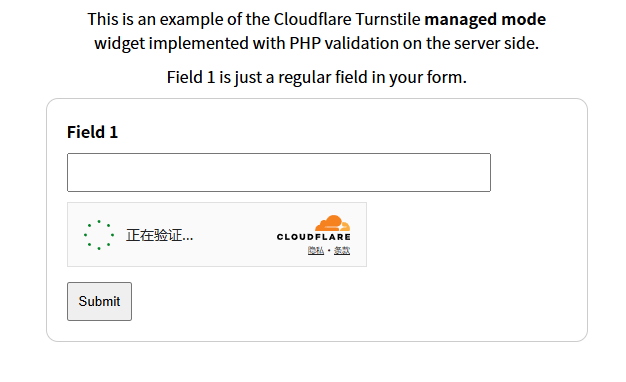
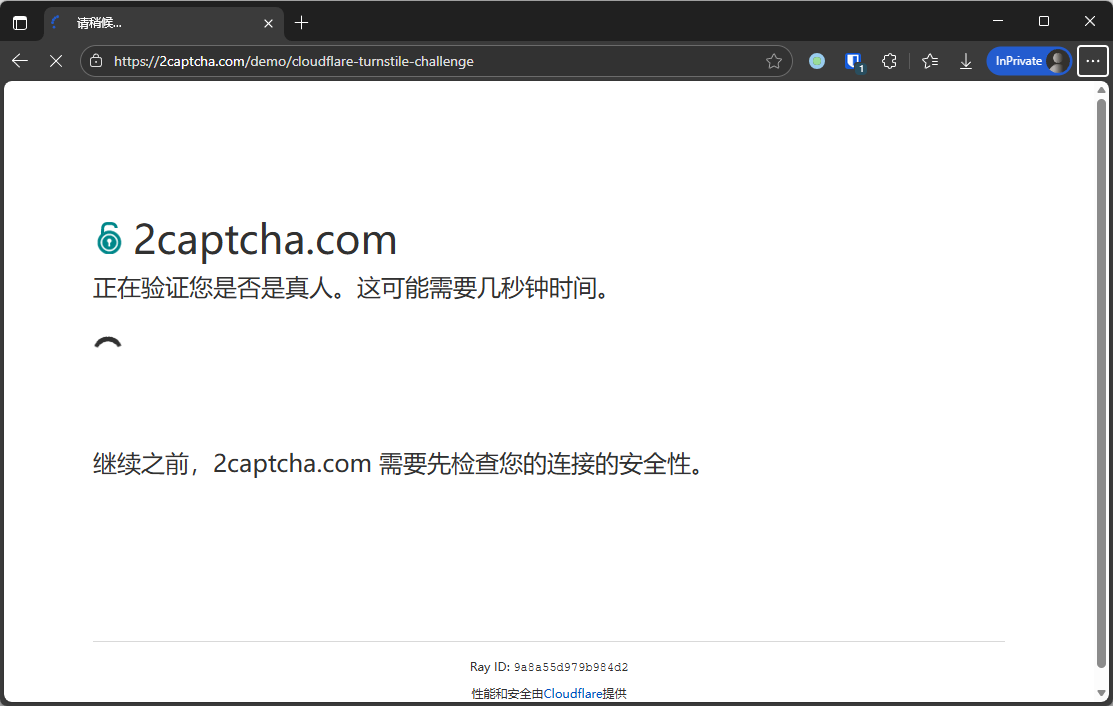
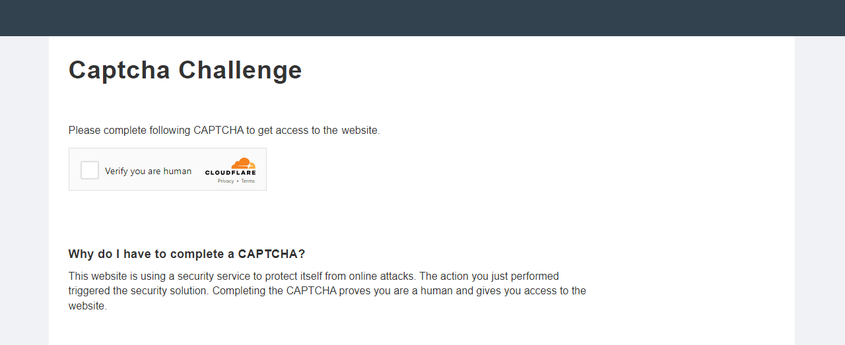
Cloudflare 验证类型可能以不同方式出现。
标准 Turnstile:
Cloudflare Challenge:
Cloudflare Challenge 定制样式变体:
Challenge 无缝集成到网站中
看起来像普通的 Turnstile 验证,但实际上是 Cloudflare Challenge。
要确认是否为 Challenge,请打开开发者工具,检查网络流量和页面源码,寻找以下典型特征:
首次请求网站时返回
403状态码。id="challenge-form"的表单的action属性(不要与 Turnstile 的 action 混淆)包含参数__cf_chl_f_tk=。页面包含两个相似的
<script>标签,它们在 window 对象中创建新值。
9.2 如何获取创建任务所需的参数
websiteKey
可以在 Elements 面板中找到:

您也可以在单独的标签页中打开验证码 URL(以 https://challenges.cloudflare.com/cdn-cgi/challenge-platform/h/g... 开头),然后使用控制台命令:
console.log(window._cf_chl_opt.chlApiSitekey);chlApiSitekey 即为 sitekey。
pageAction
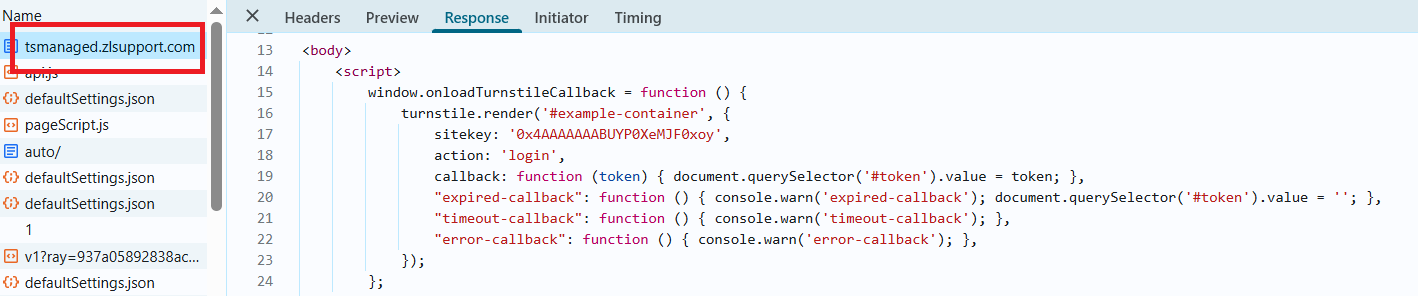
Action 和 sitekey 也可以在回调函数中找到: